
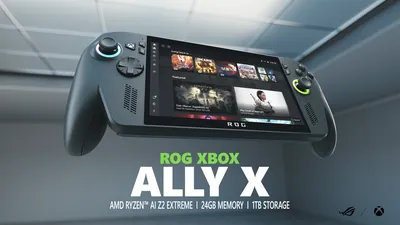
Some months ago I realized that GeForce Now doesn’t work for me while traveling. If you are interested why, there already is a more detailed blog post here: The ASUS ROG Xbox Ally X Instead of GeForce Now. In that post I wasn’t certain what device I would choose. But I had the chance to buy the ASUS ROG Xbox Ally X for a good price. In the meantime, I had enough time to test the device in depth.
Hardware & quality
But let’s start with the specifications:
- Type: Handheld Gaming PC
- Display: 7 inch IPS 144Hz FullHD (1920x1080 pixels) display with VRR (Variable Refresh Rate)
- Processor: AMD Ryzen™ AI Z2 Extreme
- RAM: 24GB LPDDR5X (soldered)
- Hard disk: 1TB PCIe 4.0 SSD (M.2 2280, changeable)
- Bluetooth 5.2, WiFi 6E
- Operating system: Windows 11 with FSE (Full Screen Experience)
But technical specifications aren’t that meaningful in the end. The processor was developed specifically for use in gaming handhelds and can’t be compared easily with desktop or notebook CPUs. But it has more power than its predecessor, for sure. However, it’s more an evolution instead of a revolution. The 24 gigs of RAM seems to be plenty, and it is more than enough for FullHD, even when it has to be shared between CPU and GPU. The swappable solid state drive is nice, in my opinion. I haven’t replaced the stock one yet, but for some, 1 terabyte won’t be enough. But what got me curious the most beforehand was the modified Windows 11, which should be optimized for gaming handhelds by providing a new Full Screen Experience (FSE). Does it work?
The handling of the device is excellent for me. I’ve read complaints about the ABXY buttons being too loud. I find them crisp and think they will become a bit quieter or more worn in over time. All other buttons and sticks work flawlessly for me. However, there is one flaw in the build quality. On the right grip, the housing doesn’t fit perfectly; there is a minimal gap. Since you hold the grip firmly in your hand, the housing parts move and creak slightly. At this price, this shouldn’t happen. But it doesn’t affect either the functionality or the ergonomics.
One last point though: The device is perfectly balanced and doesn’t tip in any direction, but the display is angled. When you place the device on its back, the display is tilted slightly backward. When I had the device in my hands, this was actually quite nice. But it still confuses me to this day, since you’re used to a flat display from the Nintendo Switch and other portable consoles. I just need to get used to this.
Software: Windows 11 with FSE
The FSE is the first iteration from Microsoft to provide a user interface tailored for gaming handhelds. Instead of booting into the usual Windows 11 desktop, the ASUS ROG Xbox Ally X loads the FSE optimised for control with touch and controller input. Additionally, the lack of the desktop allows Microsoft to get rid of some background processes and with this free up resources for gaming.
When starting the device, the FSE welcomes the user with a start page containing a lot of tiles showing the last played games at the top, but then mainly adverts to buy games in the Xbox Store or subscribe to the Xbox Game Pass. No surprise considering the name of the device, but for me the page is absolutely useless as I buy and own all my games on Steam. I also don’t plan to change this in the future, as well as I don’t plan to subscribe to the Game Pass. What puzzled me was that I couldn’t switch to any other page like the library as my main page. Every time I pressed the Xbox button or closed a game, I got presented this for me useless homepage.
With the menu on the left I can access the library. This shows all installed games, even from other sources like Steam and other launchers, at least when the launchers were installed over FSE. I’ve not tested installing other launchers that can’t be installed in FSE. But there is a big drawback, at least with FSE and Steam. FSE shows the Desktop shortcut icon on the games tile instead of a cover. This looks really ugly and you have to install the addon SteamGridDB to change the look of the tiles.
Another annoyance that shows that Microsoft still has to go a long way are the update mechanisms. The plural is by choice, as there are multiple places where the user must do updates. In the FSE, ASUS ArmoryCrate, the Windows Store and Windows Update itself. For other games, you also have to monitor their launchers. This is a mess and needlessly complicated, especially as there are no consistent notifications about new updates. Here Microsoft and ASUS must find a way to improve this. Nobody likes to regularly check four or more places for new updates.
A great feature, on the other hand, is the game bar. It opens after a simple button press as a layer over the game and provides access to the most important settings. But also other tools are available there, like screenshot, screen capture or AI support for games. The AI support wasn’t that great in my tests. Its tips were rather generic. Even with access to the game, there were no situational hints or help.
I got angry over the standby. Usually the device should go into sleep mode with a short press on the power button. Another press then should wake it up again and you can continue where you left off. The “should” in the sentence before is intentional. Most of the time it works, but sometimes it doesn’t. Then the display goes off, but the device won’t switch into standby and continues to drain power. In other cases it won’t wake up again and you have to press the button multiple times to wake it up, or you have to force restart it as multiple presses don’t help either. So you always have to save before putting it in standby.
On the other hand, the biggest advantage of Windows is that you don’t have to worry whether your game runs. All games run on Windows.
In total I would say that the system isn’t finished. With games only on Steam, it isn’t a satisfying experience. With some tinkering it is possible to switch to Steam Big Picture instead of Microsoft’s FSE, but somehow the performance of the UI wasn’t as smooth as I expected.
Software: SteamOS as an Alternative
As I use Linux on my private PC and macOS at work, I have no dependency on Windows. So I decided to give a Linux-based alternative a try. My first thought was Bazzite, which has an official port for the Xbox Ally X. But then I read the news that SteamOS 3.8 Beta also added support for the device, and I gave it a try. Installation was without any problems and I could even update to version 3.9 Beta.
The standby with SteamOS is completely different, it just works like I expect it to. Press the power button and the device goes into standby, press the button again and it wakes up in less than three seconds - exactly where you left off.
But it’s not a seamless experience. After installation you have to configure some stuff to get all functions and keys working, but when done, most stuff is running far better than on Windows. Just two exceptions at the moment: The RGB lights around the sticks can’t be configured and you can’t update the BIOS from SteamOS. The RGB lights are no drawback for me, I deactivated them after unboxing and do not intend to activate these annoying lights. And for the updates I had to create a Windows-to-go USB stick that I boot into once every month to do the updates. Not perfect and rather slow, but better than wasting space for a dual boot Windows.
What will likely never be available are the AI functions like AI upscaling utilising the built-in NPU. These features are in development for Windows, but I don’t expect them to be ported to Linux.
But overall I prefer the Linux experience over the Windows experience.
Gaming experience & performance
The gaming experience itself is mostly the same on both systems. The performance depends on the game and on the system. It’s no surprise that the device can’t run the newest AAA games with maximum details in 1080p with 144 FPS. It’s often necessary to adjust the game’s settings and try out what works best. Maybe the performance is better when lowering details or even the resolution to 900p or lower. Cyberpunk 2077 for example I play in 1080p with Steam Deck preset and reach somewhere between 35-45 FPS reliably. At first, this was confusing for me as a PC gamer. Gaming below 60 FPS is possible? I assume thanks to VRR it feels surprisingly fluid and smooth.
While my PC’s old CPU struggles to push out more than 40 FPS in Dune: Awakening, the Xbox Ally X is able to do 50-60 FPS, with FSR3 frame generation even 70-80 FPS. On lowest settings of course. Tony Hawk 1+2 on the other hand achieves 60 FPS plus with high settings, as well as Need for Speed Unbound. I even have the choice to lower the settings a bit and reduce the power limit of the console. This increases the battery life by a good amount. An extreme example is Hades that I can run in 1080p with maximum settings at 7 Watts. When lowering the settings, even 4 Watts is possible, extending the battery life to over 7 hours.
With Cyberpunk 2077 I have to crank up the power limit to 25 Watt to get stable 30 FPS plus. Going above up to 35 Watt showed no big increase in maximum FPS for me, just the 1% lows were better.
And with some other games, it’s clearly visible that they weren’t developed for a small screen. In The Witcher 3 the text is really small and blurry. I can read it, but it’s not the best experience.
Conclusion
The ASUS ROG Xbox Ally X is a gaming device to its core, and it shows. But it does this great. The ergonomics are superb and superior to the Nintendo Switch. The performance is impressive for the size and I’m totally happy with the screen. Another big plus for me is the flexibility with the operating system, so I could install and use Linux.
Competitive shooters aren’t the games I would play or recommend on an Xbox Ally X. For singleplayer games, on the other hand, it’s a great device and my chance to work off my Pile of Shame. It’s fast to stow, fast to get out and anytime ready. No searching for an external controller, no searching for a place to put my notebook and mouse on, no searching for internet to stream the games. Just power on and play.
With a price tag of 899 Euros the ASUS ROG Xbox Ally X certainly is a luxury investment. For the same money I could buy a stronger gaming laptop or four years of GeForce Now. But these options won’t be as easy and comfortable as the XAX. For me, the investment was worth it.